


【swellカスタマイズ】コンタクトフォーム7のカスタマイズ


contents
コンタクトフォーム7のカスタマイズ編
今回記事にするローカルなCSSはページ単位しか影響しない
記述の仕方になります。
例題として SWELLで Contact Form 7 コンタクトフォーム7のカスタマイズで説明します。
使い方としては先の記事で記載しているグローバルな部分のCSSは
BLOG全体の動作速度の観点からも本当に全体に必要なCSSのみに絞るべきです。
一部しか使わないCSSならローカル記述した方がメンテナンスも圧倒的に楽です。
例えば・・・
- サイトマップだけの特別な装飾
- お問い合わせページだけに使う特別な装飾
- プロフィールだけに使っている特別な装飾
みたいなCSSをすべて全ページに影響するグローバルに記述しても動作はしますが
使われないCSSを大量に読み込むのはSEO的にも好ましくありませんね。
実際のやり方を作例で説明

このBLOGの 「お問い合わせのページ」例で説明しますね。(別TABで開きます)
\ 実際に見てみましょう /
余談ですが上記のお問い合わせページはreCAPTCHAでスパム対策してありますが
BLOG高速化の為にreCAPTCHA単ページで駆動させております。
手法に興味のある方はこの記事をどうぞ(別TABで開きます)
この Contact Form 7の お問い合わせフォームは
WEB上でDaiki Oshima氏が公開されている HTMLとCSSを
このBLOG用にすこし直して
そのまま流用させていただいているわけですが
ここで記述しているCSSはこのお問い合わせページにしか使用しません。
こういうCSSはローカル記述します。
フォームのHTMLはContact Form 7 の設定画面で
貼り付ければOKです。
一応作例としてHTMLとCSSを貼り付けておきます。
お問い合わせの HTML
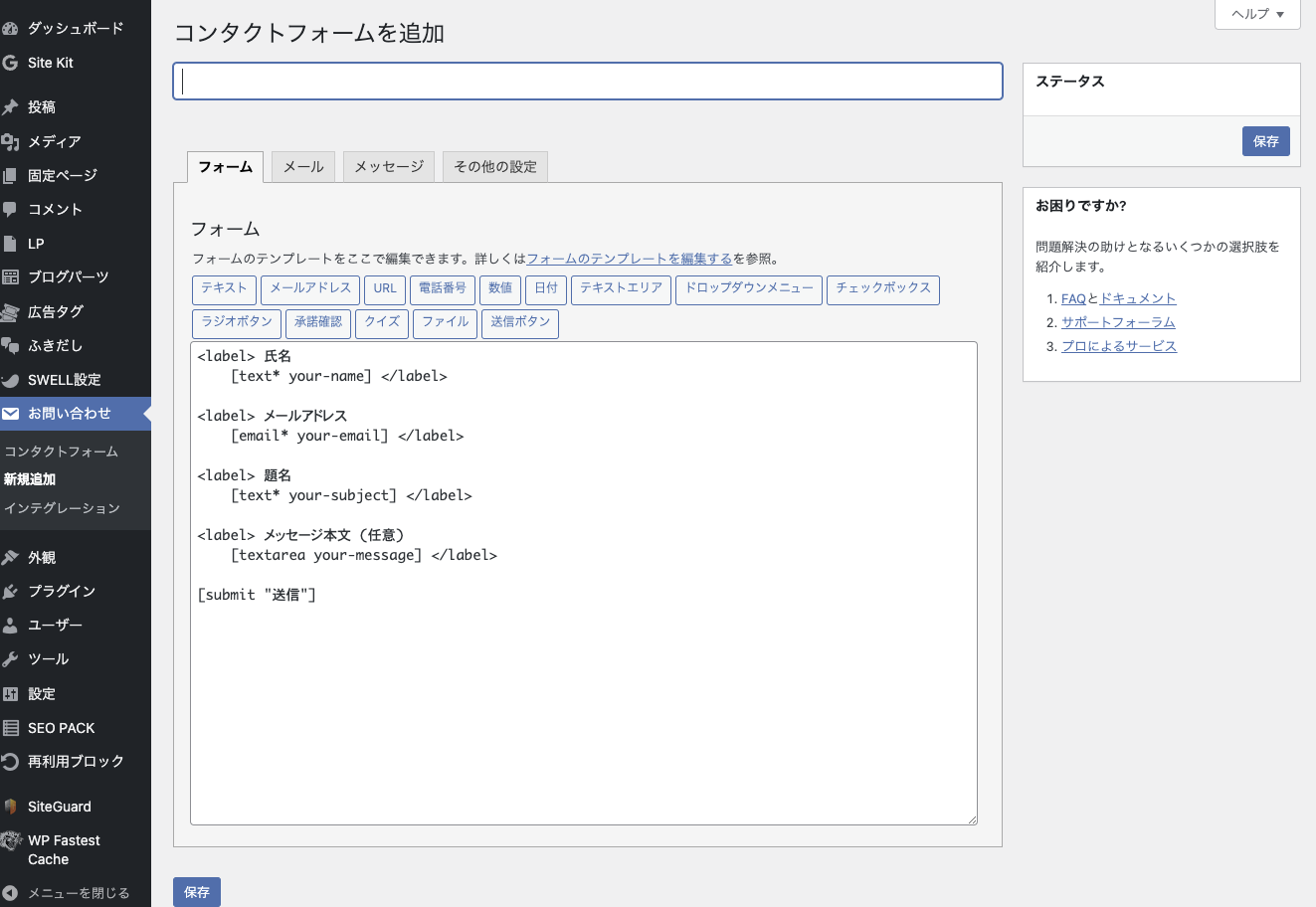
WordPress設定画面の お問い合わせの中の新規作成すると 画像のように
Contact Form 7の 初期HTMLが出ています。
初期表示されているHTMLは削除して以下と差し替えます。
<table class="inquiry">
<tr>
<th>
<span class="haveto">必須</span><span>お名前</span>
</th>
<td>
[text* your-name class:textsp placeholder"鈴木 花子"]
</td>
</tr>
<tr>
<th>
<span class="haveto">必須</span><span>メールアドレス</span>
</th>
<td>[email* your-email class:mailsp placeholder"[email protected]"]</td>
</tr>
<tr>
<th>
<span class="any">任意</span><span>電話番号</span>
</th>
<td>
[tel your-tel class:tel placeholder"090-0000-0000"]
</td>
</tr>
<tr>
<th>
<span class="haveto">必須</span><span>題名</span>
</th>
<td>[text* your-subject class:textsp placeholder"題名を記入"]</td>
</tr>
<tr>
<th>
<span class="haveto">必須</span><span>お問い合わせ内容</span>
</th>
<td>
[textarea* your-message class:content placeholder "具体的なお問い合わせ内容をご記入ください"]
</td>
</tr>
</table>
<p>[acceptance accept-this-1 class:input2] スパムメール防止のため、こちらのボックスにチェックを入れてから送信してください。[/acceptance]</p>

<center>[submit id:formbtn "上記の内容で送信する"]</center>
<center><small>
This site is protected by reCAPTCHA and the Google
    <a href="https://policies.google.com/privacy">Privacy Policy</a> and
    <a href="https://policies.google.com/terms">Terms of Service</a> apply.
</small></center>
お問い合わせの css
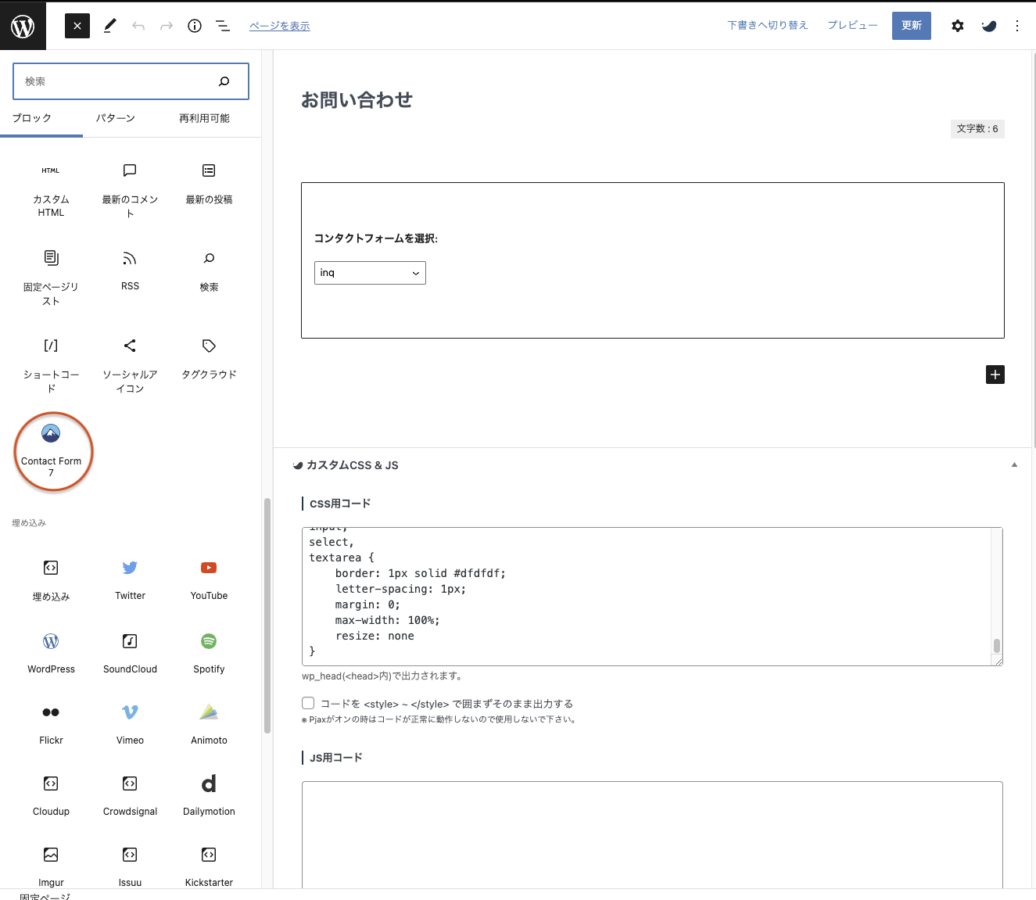
- 固定ページで お問い合わせ ページを新規作成
- SWELLのブロックエディターで 画面左上の + から Contact Form 7 の アイコンから問い合わせフォームを貼り付け)
- 下の CSSを 作成中の固定ページの お問い合わせ の画面下部の カスタムCSS&JS の CSS用コード にコピペ
input[type="text"],
input[type="password"],
input[type="datetime"],
input[type="date"],
input[type="month"],
input[type="time"],
input[type="week"],
input[type="number"],
input[type="email"],
input[type="url"],
input[type="search"],
input[type="tel"],
input[type="color"],
select,
textarea,
.field {
  display: block;
  width: 100%;
  height: 45px;
  margin-bottom: 0;
  padding: 0 12px;
  border: 0;
  border-radius: 3px;
  background-color: #eff1f5;
  box-shadow: none;
  color: #5c6b80;
  font-size: 1em;
  vertical-align: middle;
  line-height: 45px;
  transition: background-color 0.24s ease-in-out;
}
textarea {
  max-width: 100%;
  min-height: 120px;
  line-height: 1.5em;
  padding: 0.5em;
  overflow: auto;
}
@media(max-width:500px) {
    .inquiry td,
    .inquiry th {
        display: block !important;
        width: 100% !important;
        border-top: none !important;
        -webkit-box-sizing: border-box !important;
        -moz-box-sizing: border-box !important;
        box-sizing: border-box !important
    }
    .inquiry tr:first-child th {
        border-top: 1px solid #d7d7d7 !important
    }
    .inquiry .any,
    .inquiry .haveto {
        font-size: 10px
    }
}
.inquiry th {
    text-align: left;
    font-size: 14px;
    color: #444;
    padding-right: 5px;
    width: 30%;
    background: #f7f7f7;
    border: solid 1px #d7d7d7
}
.inquiry td {
    font-size: 13px;
    border: solid 1px #d7d7d7
}
.entry-content .inquiry tr,
.entry-content table {
    border: solid 1px #d7d7d7
}
.haveto {
    font-size: 7px;
    padding: 5px;
    background: #ff9393;
    color: #fff;
    border-radius: 2px;
    margin-right: 5px;
    position: relative;
    bottom: 1px
}
.any {
    font-size: 7px;
    padding: 5px;
    background: #93c9ff;
    color: #fff;
    border-radius: 2px;
    margin-right: 5px;
    position: relative;
    bottom: 1px
}
.verticallist .wpcf7-list-item {
    display: block
}
#formbtn {
    display: block;
    padding: 15px;
    width: 350px;
    background: #ffaa56;
    color: #fff;
    font-size: 18px;
    font-weight: 700;
    border-radius: 2px;
    margin: 25px auto 0
}
#formbtn:hover {
    background: #fff;
    color: #ffaa56;
    border: 2px solid #ffaa56
}
th {
    font-weight: 700;
    text-transform: uppercase;
    padding: 13px
}
td {
    border-top: 1px solid #ededed;
    padding: 12px
}
input,
select,
textarea {
    border: 1px solid #dfdfdf;
    letter-spacing: 1px;
    margin: 0;
    max-width: 100%;
    resize: none
}
実際の動作は
ページごとに用意されている カスタムCSS&JS の CSS用コードに記述したCSSは
そのページにしかcssは作用しません。
違うページに移動するとここのCSS宣言は消滅しますので他に影響を与えることはありません。
全部グローバルCSSで書いてしまうと今後似たような再定義した場合非常にめんどくさくなります。
こういう性質のCSSはこのローカル記述が可能な カスタムCSS&JS の CSS用コード に記述しましょう。
次の記事は さらに狭い範囲でのCSSの定義について説明します。
あわせて読みたい

【swell カスタマイズ】cssを部分定義する方法
SWELLで cssの部分定義をカスタマイズする 今まで 定義したCSSは 全体に効果がある ページ毎に効果がある でしたね。 実はSWELLにはまだ細かくカスタマイズできる部分が…
あわせて読みたい

【swellカスタマイズ】css定義の方法
SWELLのcssの定義のやりかた SWELLは何もしなくてもCOOLでカッコいいページは最初から可能です。 しかし・・しばらく使っていると色々やってみたくなりませんか? 「簡…


SWELL - シンプルなのに、高機能 – もっと気軽に、楽しく記事を書こう。 それを可能にするWordPressテーマです。
SWELLはGPL100%テーマです。
ライセンス制限はなく、複数サイトでご自由にご利用頂けます。
このBLOGももちろんSWELL使ってますよ!


ロリポップレンタルサーバー
筆者もこのBLOGでお世話になっているレンタルサーバー。 ハイスピードプランはLiteSpeed採用でガチで速いっすよ。
筆者もこのBLOGでお世話になっているレンタルサーバー。
ベーシックプランはガチで速いっすよ。コストパフォーマンス満足度
使い続けたいレンタルサーバー
アフィリエイト、ブログで使いたいレンタルサーバー
サポート対応満足度
すべて1位


この記事を書いた人

関連記事
-
GPT-5.6 Ultraをどこまで任せる?――検証と復旧で決める
-
ZedはVisual Studio Codeの代替になるか?AI時代のRust製エディタを現実目線で整理
-
WordPress 7.0 の管理画面フェードを止める小さなプラグインを作った
-
AI記事は整っているだけで悪なのか?文章品質と読者価値で考える
-
 Claude Codeで壁打ちしてCodexで実装は本当に最適か
 -
Google Search Console の見方と活用法【初心者向け解説】
-
そもそもCDNってなんだよ?って人のための記事
-
WordPress × LiteSpeed Cache × Cloudflare CDN構成【2025年最新版】